About
jack_oscrolloscope is a simple waveform viewer for JACK. The waveform is displayed in realtime, so you can always see the signal the instant it comes through JACK's input port.
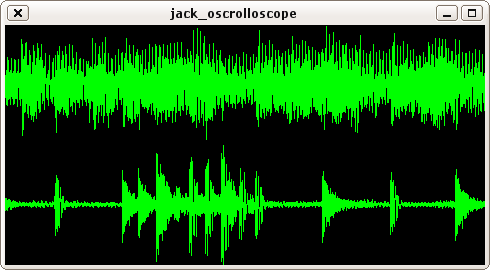
jack_oscrolloscope showing two tracks.

jack_oscrolloscope in non-scrolling mode, clipping is indicated in red, current position in white.
Download
jack_oscrolloscope-0.7.tar.gz (2011-01-29)
Dependencies
- JACK Audio Connection Kit
- SDL (Simple DirectMedia Layer)
- OpenGL (needs to be present for compilation, hardware/driver support is optional)
Installation
In the jack_oscrolloscope source directory, run: make,
and then, as root: make install.
Usage
Command line options:
jack_oscrolloscope [options] [port ...]

-N <name>        JACK client name
-n <number>      number of input ports
-d <seconds>     duration of audio being displayed (default 5s)
-c               indicate clipping
-s               disable scrolling
-x <pixels>      set window width
-y <pixels>      set window height
-C <color,...>   set waveform color
-S <scale,...>   set waveform scale
-Y <height,...>  set waveform height (per port)
-G               don't use OpenGL for drawing
-f <fps>         video frames per second (default 50, 0=unlimited/vsync)
-h               show this help
Config file:
You can put default options into the config file ~/.jack_oscrolloscoperc. This file should consist of one single line, with the options just like you would have entered them on the command line.
Options given on the command line override those in the config file. To override options which take no arguments, append 0. E.g. to override "-s", use "-s0".
Port arguments are not yet supported in the config file.
Troubleshooting
jack_oscrolloscope eats too much CPU:
Unfortunately, with SDL (option -G), scrolling currently can't be hardware accelerated on X11. If this is an issue, use OpenGL, disable scrolling (-s), or reduce the window size / number of tracks.
Too much jitter...:
If scrolling is not as smooth as it ought to be, you should...
- Enable vsync (highly recommended). How to do this depends on your hardware/driver. If you're using the Nvidia driver, jack_oscrolloscope will automatically enable vsync by setting the environment variable __GL_SYNC_TO_VBLANK=1. ATI users may find this helpful.
- Once vsync is working, use the "-f 0" swich to make sure that jack_oscrolloscope runs at the same frequency as your monitor.
You may want to put "-f 0" into your ~/.jack_oscrolloscoperc.
Do not use -f 0 unless vsync is actually working, as that would only cause a useless
waste of CPU cycles.